

HealthTech SaaS: Transforming Healthcare with Scalable Digital Solutions The last couple of years have witnessed digital technology start to revolutionize the healthcare industry to a far greater degree. From artificially intelligent diagnoses to telemedicine, the sector has not minced words when it comes to welcoming innovation in a bid to enhance care, patient outcomes, and cost. Amongst them, Software as a Service (SaaS) has been a vigorously disruptive model. With flexible, cloud-based infrastructure, physicians can now have best-of-breed solutions without breaking the bank on infrastructure. Healthtech SaaS solutions are enabling startups, clinics, and hospitals to realign their businesses, enhance patient engagement, and workflowize their habitual ways of operating in unprecedented ways. SaaS expansion in healthcare is not a trend, it’s a transformation in the creation of digital health technology, implementing it, and selling it. With payers and providers needing to provide quality care at affordable rates, SaaS is the answer with the responsiveness and quickness required to fill rising patient expectations and regulatory demands. What is Healthtech SaaS? Healthtech SaaS are web-based application which are designed for use by healthcare organizations. Instead of having software installed on-site, the providers would use the programs via the web and buy them for a subscription charge. The system reduces capital outlay, is simple to maintain, and enables one to expand services as needed. Healthtech aaS firms are leading the way in developing solutions across a variety of healthcare functions, from patient management systems to clinical decision support systems. Such firms develop software that co-exists with the existing medical hardware but provides value-added functionalities like real-time sharing of data, interoperability, and health data compliances like HIPAA or GDPR. SaaS has strongly held the healthcare industry because it is economical and flexible. It can be a giant healthcare system or a nanoscopic ambulatory clinic, but organizations are able to deploy SaaS applications that are their own specific requirement without spending money on costly hardware. Major Healthtech SaaS Features Modern-day Healthtech SaaS solutions are designed to address the specific challenges in the healthcare industry. Some of the major features are: Scalability and Flexibility – SaaS solutions expand with the business. As patient volumes rise or new services are introduced, software can be upgraded with little downtime. Interoperability – Siloed data within systems is healthcare’s greatest pain point. Cloud solutions offer integrated electronic records, imaging, and lab reporting for coordinated patient care. Security and Compliance – Since medical information is confidential, such solutions are designed with top-of-the-line encryption, access control, and compliance accreditations. Remote Access – Clinicians, administrators, and patients remotely access services, an essential feature in today’s times, with telemedicine and remote consultations becoming the new normal. AI and Analytics Integration – Some SaaS platforms today integrate artificial intelligence and predictive analytics to inform clinical decision-making, streamline workflow, and drive patient outcomes. Such inherent features make the SaaS applications adapt to the evolving needs of today’s healthcare practitioners and evergreen topics such as inefficiency, data silos, and reduced accessibility. Advantages of Healthtech SaaS The Benefits of Healthtech SaaS cover the entire healthcare care continuum, ranging from providers to patients Cost-Effectiveness: The care organizations do not have to invest in costly IT installations anymore. Subscription solutions provide room for sustainable as well as predictable budgeting. Quick Deployment: It becomes simpler to deploy at a faster rate using the Cloud-based Healthtech SaaS application, and value time will be lower compared to traditional software systems. Better Patient Care: Since the patient data and rich analytics will be at their fingertips, the caregivers can make faster and better choices. Better Collaboration: Various departments within a hospital or even across hospitals can exchange information securely in real time. Patient Engagement: Patient portals, scheduling Healthtech SaaS applications, and telemedicine software are integral to most SaaS solutions that enable the patients to become engaged healthcare consumers. The transition to cloud health care computer programs has been extremely beneficial in times of crisis, such as in the case of COVID-19 when there was a dire need for more digital adoption. Book Your Free Marketing Consultation Challenges and Considerations Health care takeup of SaaS, as sweet as it sounds, does carry some drawbacks with it that need to be managed carefully: Data Security and Privacy – Patient information has to remain confidential. Betrayal would not only violate trust but would also invite draconian legal penalties. Legacy System Integration – Legacy infrastructure is the property of most healthcare organizations. Integration of cloud-based SaaS Healthtech with legacy infrastructure can prove to be troublesome. Regulation Compliance – SaaS providers are subjected to extremely stringent regulations, and regulations themselves may also differ enormously across countries. Expense Control – Although subscription addresses initial cost control, periodic expenses might end up being very expensive unless controlled properly. Training and Change Management – Proper training of medical professionals in order to shift to new electronic workflows needs to be ensured. These are the key considerations for healthcare professionals to keep in mind so that they can take a well-informed decision about SaaS adoption. Future of Healthtech SaaS There are great opportunities for Healthtech SaaS with innovation driving growing adoption among healthcare economies. Emerging trends are the way of the future: AI-Based SaaS: There will be greater applications of artificial intelligence and machine learning to diagnostics, predictive medicine, and work-flow automation. Telemedicine Integration: The crisis created impetus for adoption, and Healthtech telemedicine SaaS will continue to be useful in remote consults as well as digitally enabled delivery of care. EHR Evolution: EHR SaaS healthtech will extend interoperability to facilitate patient data exchanged between providers in real time and in redundancy. Personalized Medicine: SaaS platforms through big data analysis will enable the application of treatment to be customized by patient genetics and lifestyle. Startup Innovation: The market is aching to be disrupted, and Healthtech SaaS startups will become more and more force multipliers of innovation and agility, focusing mainly on niche spaces such
AIaaS (Artificial Intelligence as a Service): Definition, Platforms, Use Cases & Future Artificial Intelligence as a Service (AIaaS) is transforming the way businesses are embracing digital transformation. Cloud enablement of artificial intelligence functionality allows organizations to access powerful tools without establishing costly facilities internally. Ease has been one of the greatest drivers of global adoption, providing innovation, automation, and scalability to any business firm size. With AIaaS vendors, businesses now employ machine learning, natural language processing, data analytics, and computer vision without or with little initial capital expenditures. The explosive increase in the AIaaS market size only reflects how precious such services have become to industries such as finance, healthcare, retail, manufacturing, and technology. What is AIaaS? AIaaS refers to the artificial intelligence capability that is provided by the cloud. Instead of using massive AI teams or building custom infrastructure, AIaaS companies can subscribe to the services of AI offered by large cloud AIaaS providers. They range from simple chatbots to advanced predictive analytics and deep learning models. Key benefits are cost efficiencies, lower time to implement, and easy access to AI innovation. Organizations can select AIaaS pricing models like pay-per-use, month-to-month subscription, or company-wide contracts based on size and needs. AIaaS vendors offer plug-and-play AI offerings, making intelligence available to everyone from startups to multinationals, driving high growth rates of AIaaS across the world. Central Building Blocks of AIaaS AIaaS is not a product or product suite but a collection of services to meet different business needs. The most crucial ones are usually: 1. Machine Learning (ML) Services Machine learning allows computers to make predictions and recognize patterns from data. With AIaaS, businesses can utilize pre-trained models to detect fraud, forecast churn, or predict demand. AIaaS ML capabilities can be deployed today compared to resource- and time-consuming traditional development. 2. Natural Language Processing NLP enables computers to read, comprehend, and produce natural language. NLP technologies are being utilized by AIaaS in business to introduce chatbots, voice assistants, and machine-learning-based translation software. Call centers use NLP to offer enhanced customer service via the real-time analysis of conversations. 3. Computer Vision Computer vision services read and interpret visual data. Businesses apply them to intelligent inventory management, and hospitals to diagnostic imaging. AIaaS makes them available to everyone, even where there is no native support of AI. 4. Data Analytics & Predictive Insights Today’s AIaaS in business is facing massive amounts of data. AIaaS providers use platforms to process them in an efficient manner, find the patterns lying beneath, and forecast things that will yet occur. Whether risk modeling of finances, supply chain management, or predictive analytics makes better-informed decisions. 5. Robotics & Process Automation AIaaS enables workflows to be automated through the replacement of repetitive human steps by AI-driven bots. It simplifies operations while concentrating human labor on more valuable tasks. These, together, are transforming AIaaS platforms into the panacea that can be utilized by nearly any business. Popular AIaaS Platforms Leveraging the utilization of AIaaS first are large cloud vendors with highly elastic and scalable AI offerings. Popular AIaaS platforms are: Amazon Web Services (AWS AI Services): Offers Amazon Rekognition (video and image analysis), Lex (voice interface), and Polly (text-to-speech synthesis). AWS enables enterprise-level reliability and scalability. Google Cloud AI: Provides AutoML for creating proprietary models, Vision AI, and Natural Language APIs. Google AIaaS is primarily utilized for research and development. Microsoft Azure AI: Has Azure Machine Learning, Bot Services, and Cognitive Services. Utilized primarily by organizations for effortless integration with Microsoft’s platform. IBM Watson: Famous for NLP, Watson leads AIaaS that has extensive AIaaS in healthcare and business analytics. Oracle AI Services: Offers AI-driven automation and predictive analytics, ideally suited for enterprise data-driven organizations. Niche specialist start-ups are preceded by AIaaS market size and new-age AIaaS solution start-ups. Applications of AIaaS AIaaS uses are numerous and growing day by day. Some of the most common ones are: Customer Experience: AI chatbots and recommendation engines are used by shopping and service enterprises to make customer interactions personalized. Finance: AI is utilized by banks for fraud detection, credit risk assessment, and customer analysis. Healthcare: Hospitals employ AI diagnostics in radiology, prognosis-driven health monitoring, and drug development. Expansion in healthcare AIaaS shows the requirement in the sector for timely, accurate processing of data. Manufacturing: Predictive maintenance reduces downtime with predictions of equipment malfunction before occurrence. E-commerce: Websites rely on AI for enabling targeted purchasing, price optimization, and supply management. Marketing & Sales: Businesses utilize AI to make better customer decisions, improve targeting, and gain greater ad spend control. Real-world applications of AIaaS are the recommendation algorithm used by Netflix, banks utilizing AI anti-fraud solutions, and hospitals utilizing computer vision for disease diagnosis. Book Your Free Marketing Consultation Benefits of AIaaS to Organizations The AIaaS use cases are operational and strategic: Cost Savings: Free up companies from the expense of expensive AI infrastructure. Rapid Deployment: Organizations deploy pre-trained models within days rather than months. Accessibility: AIaaS is opened up to new startups and small and medium businesses. Scalability: The services are scalable without much effort as usage and data scale up. Continuous Innovation: Providers update models with new AI techniques. By becoming part of the work process, business AIaaS offers a competitive advantage, superior decision-making, and innovation. Challenges & Considerations Deployment of AIaaS is difficult: Data Privacy & Security: Information stored on third-party hardware needs to adhere to serious regulatory requirements like GDPR and HIPAA. Customization Constraints: Though deployment is rapid through pre-trained models, they can be irrelevant in uncommon business contexts without customization. Challenges in Integration: Integration with existing systems and AIaaS products could be cumbersome. Vendor Lock-In: Single vendor sole reliance could limit adaptability. Cost Management: Unwarranted utilization of pay-per-use types of AIaaS can result in excessive expenditure. These have to be weighed to achieve maximum return on investment. The Future of AIaaS There is a rose-tinted future of
Robotic Process Automation (RPA): What It Is, How It Works, and Use Cases The contemporary business environment runs at the pace of velocity, efficiency, and precision. The world is racing fast, so companies are continuously looking for the means to automate routine tasks and cut costs. One of the most innovative technologies to achieve the same is Robotic Process Automation (RPA). Automation has existed for decades in the past, but RPA is a fresh idea that operates very well with digital platforms without necessitating revolutionary IT reworks. This article describes what RPA is, how RPA works, robotic process automation workflow, RPA applications by industry, and the future of automation. What is Robotic Process Automation? Robotic Process Automation refers to the automation of structured and repetitive business processes by software robots. RPA is different from conventional automation, which demands much coding expertise. RPA can be applied with very minimal programming expertise. The software robots have the capability of performing any type of activity, from data extraction and processing of transactions to sending automated e-mails. RPA is applied by the majority of RPA in business companies to facilitate automation, enhance customer satisfaction, and assist employees in performing more meaningful work rather than repetitive ones. How RPA Works To appreciate its worth, one should understand how RPA works. In real life, RPA technology communicates with programs in the same manner as human beings clicking buttons, filling in forms with data, copying data, and dragging and dropping files but faster and more precisely. How it works is normally the following processes: Identify the Task – Identify the rule-based repeatable task that can be automated. Design the Workflow – Give the sequence of activities used to accomplish the task. Configure the Bot – Employ robotic process automation software to automate the bot to follow the workflow. Test the Automation – Test that the bot executes tasks flawlessly without bottlenecks. Deploy the Bot – Employ it in daily operations. Monitor and Maintain – Monitor performance and upgrade as processes evolve. Elements of an RPA Workflow A robotic process automation process is made up of a number of linked pieces: Input Triggers – Triggers to initiate automation, for example, receipt of email or file. Data Processing – Extraction and restructuring data based on predefined rules. System Interaction – Performing actions between multiple software tools such as CRMs, ERPs, or databases. Output Generation – Generating reports, notifications, or updating records. This work is developed by professionals who have domain knowledge, which in the context of RPA developer roles would be the people ensuring that the bots are running smoothly and securely. Benefits of Robotic Process Automation Robotic process automation benefits cross across lines of an industry as well as a business function. Some of the key benefits of robotic process automation are: Cost Savings – Automation negates labor expenses by handling high volumes of repetitive tasks. Accuracy – Robots remove human errors, and therefore there is consistency and precise output. Speed – Activities that would take hours to complete in the past can now be completed in minutes. Scale – Businesses can upgrade the number of bots for processing increased loads. Staff Satisfaction – Workers are relieved of redundant work to engage in strategic, value-critical work. Book Your Free Marketing Consultation RPA vs AI RPA vs AI are, at times, compared, but the two are not quite alike, even though both are automation tools. RPA runs under set rules and workflows, while AI involves learning, making decisions, and adapting to new situations. In real life, they seem to go hand in hand. AI can learn and decide what action to take, but RPA executes the resultant actions. ● RPA Use Cases in Different Industries There are a number of RPA use cases where automation provides real advantages. The most relevant examples are elaborated below. ● Banking and Finance In the banking sector, RPA in finance is implemented for fraud detection, compliance reporting, loan servicing, and onboarding customers. Bots can process massive transaction volumes without an error, provide regulatory compliance, and achieve operational effectiveness. ● Healthcare In medicine, RPA in healthcare automates medical record management, billing, claims processing, and patient scheduling. More time for patient care is available for clinics and hospitals since there is less administrative work. ● Retail and E-commerce Retail companies utilize bot control to control inventory, process orders, and accept returns. It helps minimize fulfillment time and improve customer satisfaction. HR departments leverage automation for the onboarding of employees, payroll processing, and hiring tracking that minimizes data input. Robotic Process Automation Examples To illustrate its application, the below realistic robotic process automation examples are presented: Invoice Processing – Invoices are automatically captured and uploaded into accounting systems. Customer Support – Chatbots can automatically respond to frequently asked questions via chat or email. Data Migration – Automated transfer of data from old systems to new application software with zero human intervention. Compliance Audits – Reporting in real-time compliance with regulatory authorities. RPA Implementation Strategy To RPA implementation effectively, there is a need for good planning and stakeholder engagement. Organizations need to: Identify High-Value Processes – Select processes with high volume, high frequency, and well-defined rules. Secure Executive Support – Executive sponsorship for funding and adoption. Select the Proper Tools – Select an extendable and secure RPA platform that can be integrated with the current systems. Pilot Test – Pilot small first, scale up. Train Employees – Make the employees comfortable working with bots. Watch and Refine – Continuous monitoring of performance and optimization. RPA success depends on mapping technology to business objectives and making it regular. Role of RPA Bots in Automation At the heart of automation are RPA bots computer codes that get work done just like they were instructed. The bots can operate 24/7, handle several workflows simultaneously, and operate on numerous

All You Need To Know About Adjudication in Medical Billing Of all the processes in the health care business, claim adjudication is likely the most important yet most misunderstood. When a patient receives treatment, the health care organization will file a claim with the insurance carrier in an attempt to be reimbursed for the services rendered. The claim is put through a stringent review process before it is accepted, paid partially, or denied. This option, a review, preserves precision, insurance policy adherence, and equity in compensation. It is self-explanatory, which makes providers and patients conscious of the complexities of medical billing and coding and avoids money surprises and procrastination. What Is Adjudication in Medical Billing? Over a few patients and even physicians are left wondering, What is adjudication in healthcare? In short, adjudication is the action taken by the insurance companies to settle medical claims and verify whether the claim is valid and must be paid. This is one of the actions that fall within the overall process of medical coding and billing and is an important component in making sure that payments are accurate and timely. Adjudication verifies the information in the claim, such as what kind of service was done, whether or not the treatment was medically necessary, and whether or not the patient’s policy pays for it. If it is all correct, the insurer pays the provider minus patient responsibility, such as deductibles and co-pays. Key Steps in the Adjudication Process Medical claim adjudication is a step-by-step process in which each step in claim adjudication is designed to validate and verify the received claim. Providing knowledge of these steps will help minimize errors and maximize payment cycles. Claim Submission The provider submits the claim either electronically or in hard copy to the payer. The claim includes patient data, procedure codes, diagnosis codes, and charges. Initial Review The payer verifies that the claim is complete and formatted correctly. Incomplete or badly formatted claims are generally rejected at this stage. These are not denials but must be corrected before resubmission. Eligibility and Coverage Check The insurance company reviews the policy of the patient to confirm whether or not the service is covered. It also verifies if the prior authorization, if it is necessary, has been requested. Prior authorization and adjudication go hand in hand, and it is crucial because claim denial reasons can be made despite the service being medically necessary without an authorization request. Medical Necessity Review The payer determines if the treatment is according to contemporary medical practice. The treatments considered unnecessary can be decreased or payment refused. Benefit Determination The payer pays out based on the terms of coverage. The deductible, co-pay, and coinsurance percentages are utilized in this case. Payment or Denial Issued After all the reviews are done, the payer makes a decision. Providers get an explanation of benefits (EOB), reporting how the claim was adjudicated, how much was paid, and patient responsibility. Every stage of the claim adjudication process is the basis of the payer’s decision and directly affects the provider’s income and the patient’s cost. Common Adjudication Outcomes The process of payer adjudication can lead to numerous outcomes, and each outcome varies for the patient and provider. Approved Claims: In case of complete compliance with all the criteria, the claims get approved, and payment is provided to the provider. Partially Approved Claims: The payer pays partially for the services, and the balance is as patient’s responsibility. Denied Claims: The claim is denied for reasons such as incomplete information, not being a part of the policy, or not fulfilling policy conditions. These are a few of the reasons for claim denials, and providers must address these at an early stage to avoid a loss in revenue. Pending or Under Review: Some claims need extra information to be provided before making a final decision. Payors like to receive clean claims as opposed to denied claims since clean claims are reimbursed promptly and are less likely to be contested. Book Your Free Marketing Consultation Factors That Impact Adjudication Several factors might influence the adjudication cycle and the insurance adjudication in medical billing, such as: Accuracy of Claim Data: Mistaken calculations or inaccuracies in patient demographics, coding, or provider data typically lead to delays. Policy Coverage: If the service is excluded under the patient’s policy, then the claim is automatically denied. Medical Necessity Documentation: Payments are not made if the documents are illegible or of poor quality. Use of Technology: Adjudication software health systems are used by some payers in a bid to avoid human error but strictly following coding guidelines. Timely Filing: Late filing of claims may result in automatic denial. Pre-Authorization: Pre-authorization services of all kinds must meet payer requirements so that they do not result in denials. These are the reasons why speed and accuracy in claim submission are paramount for providers and patients. Importance of Adjudication for Providers and Patients The question that arises is, why adjudication of healthcare and how is it such a huge deal? For healthcare providers, adjudication ensures they of fair reimbursement on time for what they do. It is one of revenue cycle management’s processes that has a very real and deep effect on the financial health of a healthcare organization. For patients, adjudication provides transparent and accountable medical claim processing. Healthcare claim processing ensures medically necessary and covered treatments are billed separately. The medical billing claim approval process in medical billing protects patients from paying for treatments their insurance covers. Patients can also verify their explanation of benefits (EOB) to verify accuracy and detect discrepancies. Tips for Smoother Adjudication To minimize delays and optimize reimbursements, providers have to do their best: Submit Clean Claims Make claims precise, complete, and coded correctly. This reduces rejections and denials. Verify Patient Eligibility in Advance Verify insurance coverage before the appointment to avoid surprises later on. Obtain Prior Authorization When Necessary Failure to do so is among the most
Cloud Asset Management: Optimize and Track Your Cloud Resources Effectively With digitalization, there is the age of cloud computing, where business organizations rely more and more on cloud technology to enhance productivity, reduce operational costs, and grow at a frenetic pace. As cloud infrastructure grows, however, there are higher complexities in managing and cloud resource tracking. This is where Cloud Asset Management becomes critical. What is Cloud Asset Management? It is the structured process of monitoring, maintaining, and optimizing cloud assets such as storage, compute capacity, applications, and data services. Whatever your cloud environment, AWS, Azure, Google Cloud, or if you’re utilizing SaaS asset management solutions, a thoughtful plan keeps your assets safe, efficient, and compliant. What Is Cloud Asset Management? Cloud Asset Management (CAM) involves maintaining an accurate inventory of cloud-based digital assets and monitoring their usage, lifecycle, compliance, and cost. It is not just cloud inventory management; it’s more about attaining cloud security and asset control on hybrid or multi-cloud infrastructures. A well-executed CAM system advantages businesses in the following advantages for businesses: Avoids over-provisioning and wasteful expenditures Offers software license tracking Enforces security policies Eases audits Guarantees business continuity Cloud asset tracking ensures that no asset is left unguarded or wild. With more and more companies maturing in cloud infrastructure management, CAM becomes an enterprise-critical process. Why Cloud Asset Management Is Critical Cloud resource monitoring has grown in recent years, and businesses must cope with visibility, security, and cost concerns. Traditional IT asset management in cloud infrastructure is no longer sufficient. Infrastructure today is dynamic, and resources are created and destroyed on an as-needed basis. Reasons why CAM is important include: Cost Management: Without monitoring, cloud costs can spiral out of control. Maximum cloud cost optimization ensures resources are matched to true utilization. Compliance: Compliance regulations like GDPR and HIPAA mandate that you have insights on where data is sitting and who is accessing it. Security: Orphaned assets are most frequently employed in cyberattacks. Monitoring puts the kibosh on risks. Operational Efficiency: Automated cloud asset discovery tools and audits put an end to time and human error. Essential Elements of Successful Cloud Asset Management To develop an effective strategy, several essential items must be dealt with: 1. Asset Discovery Asset discovery tools for the cloud enable organizations to scan their environments to locate all assets in use, whether it is a virtual machine, container, database, or SaaS product. Discovery forms the foundation for asset tracking. 2. Inventory Management This is done by documenting all your cloud assets, purpose, configuration, ownership, and status. Effective cloud inventory management makes it dynamic and real-time. 3. Configuration Management Cloud configuration management enables effective setup of assets and compliance with policies. Misconfigured assets are a primary source of vulnerabilities. 4. Lifecycle Tracking Each cloud asset has a lifecycle, from creation to retirement. Asset lifecycle in cloud environments must be monitored in order to update, patch, renew, and decommission properly. 5. Integration with Security Tools Asset management and cloud security are synonymous. Your asset management system should be integrated with firewalls, SIEM products, and identity management tools to provide improved protection. Book Your Free Marketing Consultation Tools and Platforms for Cloud Asset Management Numerous platforms support cloud asset management efficiently. The finest tools offer visibility, automation, and integration. Some of them include: AWS Config and AWS Asset Manager Azure Resource Graph Google Cloud Asset Inventory ServiceNow ITAM for software asset management (SAM) Flexera Cloud Management Platform Snow Software for digital asset management in cloud These options help enterprises gain multi-cloud asset visibility, IT-finance alignment, and a clean and optimized cloud structure. Best Practices for Optimizing Cloud Resources To stay ahead of the game, businesses must bring CAM practices in line with best practices: 1. Asset Discovery Automation Tracking manually is no longer a choice. Use cloud asset discovery tools to automate real-time identification of changes in your environment. 2. Centralized Asset Repository Centralization supports sharing asset information across teams, enhancing collaboration and accountability. 3. Tagging and Metadata Standards Assign metadata to every asset (owner, cost center, purpose) to ease categorization and budgeting. 4. Align with a SaaS migration strategy Align asset management with your SaaS transition plan during the migration from legacy to cloud. Know what is being migrated and how it is managed after SaaS migration. 5. Focus on cloud cost optimization Review utilization and rightsizing opportunities from time to time. Retire idle assets or move to reserved capacity where appropriate. 6. Configure Alerts and Policies Alerts for non-compliant configuration, unexpected usage, or cost spikes allow for early action. 7. Regular Audits Monitor and refresh your cloud asset tracking information from time to time. This keeps your system current and helps with better decision-making. Challenges in Handling Cloud Assets While essential, CAM also has its challenges: Scalability: As businesses grow, so do assets. It is hard to keep pace without automating. Shadow IT: End-users spin up services without the IT department’s knowledge, and thus unknown or unseen assets are created. Lack of Standardization: Cloud providers use different naming conventions, making it hard to track in harmony. Security Gaps: Misconfigured or orphaned assets risk being targeted by attackers. Budget Issues: Without tracking, IT budgets can never be balanced with real usage, and overspend happens. Mitigating these challenges requires spending money on tools, training, and policies that focus on present-day cloud environments. Tools for Cloud Asset Management Let’s go through and mark the products easing cloud asset management: ServiceNow ITAM – a large-enterprise-class solution to monitor software and hardware
SaaS Migration: Strategy, Challenges, Tools & Implementation Guide With more and more businesses adopting digital transformation, Software as a Service (SaaS) is on the way to becoming the new norm in software deployment. The on-premises software of the past, though widespread, is giving way to cloud-native applications due to the fact that they are flexible, low-priced, and scalable. Migrating to SaaS allows companies to de-clutter the process, transfer the infrastructure burden, and gain real-time access to mission-critical applications. SaaS migration is the process of moving legacy systems, applications, or data from hosted or SaaS to on-premise-based cloud environments. But it’s no walk in the park. Strategic planning, correct tool identification, and best tackling technical and organizational SaaS migration challenges come into play. What is SaaS Migration? SaaS migration is the relocation of software programs, data, and IT infrastructure from on-premises or traditional platforms to a SaaS platform that is in the cloud. Migration can involve the relocation of proprietary platforms, customer-facing software solutions, back-office software, and databases to subscription-based new cloud solutions. As opposed to the traditional software which is required to be downloaded and installed, SaaS applications are visited through web browsers and hosted by third-party sources. Not only does this restrict maintenance activities, but also gives access to automatic updates, remote connections, and platform compatibility with other cloud apps. Companies carrying out SaaS migration checklist aim at: Improving scalability Reducing costs Improving performance and availability Improving security and compliance of data Reducing dependence on physical infrastructure SaaS Migration Strategy There must be a successful SaaS migration strategy to avoid business disruption and ensure effective usage. The following are the necessities of a great SaaS transition roadmap: 1. Business Case Assessment Begin by defining why your business must migrate. Determine the value proposition, i.e., reduced IT burden, improved customer experience, or improved agility. This is to synchronize technical objectives with business objectives. 2. Application Inventory & Prioritization Define all legacy systems and their existing performance, interdependencies, and business significance. Applications can be ranked to proceed by complexity, risk, and significance. 3. Data Audit Conduct a data audit to understand what needs to be migrated. Consider data volume, data structure, sensitivity, and compliance requirements. Also, do data cleansing to eliminate duplicates or outdated data. 4. Define a Migration Model Select the way you want to migrate: Rehosting (Lift and shift) Refactoring (Rebuilding for cloud compatibility) Rebuilding (Designing the app from scratch for SaaS) Replacing (Deploying a new SaaS solution) All are cost- and time-based. 5. Security & Compliance Planning Make the SaaS platform compliance-aware concerning standards such as GDPR, HIPAA, or SOC 2. Implement security controls for data encryption, user access, and system monitoring. Typical Challenges in SaaS Migration SaaS migration also comes with its own set of problems. Expecting them can avert risks: 1. Data Migration Issues Mass SaaS data migration from old systems to SaaS can be challenging. Inconsistencies in formats, data loss, and downtime are some of the concerns. 2. Application Incompatibility Old applications may be incompatible with the cloud SaaS migration. Codebases with antiquated code or homegrown applications may require enormous refactoring. 3. Resistance to Change Resistance by employees or technical incapacity can be an impediment to the uptake. Training and metamorphosis are very crucial. 4. Issues in Integration SaaS integration services in applications with installed software or third-party applications may require custom APIs or middleware. 5. Compliance & Legal Issues Healthcare, financial, or government spaces need to meet strict data handling protocols. Cloud providers should be able to meet such demands. 6. Cost Blowouts Inadequate planning or downplaying of resources will lead to runaway project costs, especially when re-engineering is unexpected. Book Your Free Marketing Consultation Key SaaS Migration Tools & Platforms SaaS migration success will greatly rely on the tools and platforms used. The SaaS migration tools enable planning, automation, integration, and monitoring. 1. Migration Tools CloudEndure for low-downtime real-time replication AWS Migration Hub for SaaS application migration status monitoring Azure Migrate for planning workload and on-prem migration Google Migrate for Compute Engine 2. Integration Platforms MuleSoft and Zapier for app integration through APIs Dell Boomi for application and data integration within the SaaS environment 3. Monitoring Tools Datadog and New Relic, SaaS management tools, for app performance monitoring during and after migration. CloudWatch for AWS and log real-time monitoring Implementation Guide: Step-by-Step SaaS Migration Use this step-by-step SaaS implementation process guide to realize a planned and successful migration process: Step 1: Pre-Migration Assessment Evaluate business goals and analyze current infrastructure Conduct technical feasibility study Assign a migration team with clearly defined job responsibilities Step 2: Define Scope and Timeline Divide the project into phases Allocate success criteria and milestones Create fallback and rollback plans Step 3: Prepare Data Backup all data in locations Sanitize and validate the datasets Map fields of legacy to SaaS migration fields Step 4: Choose SaaS Provider and Tools Select a vendor with the ability to deliver performance, security, and regulatory compliance Review SLAs, data retention, and disaster recovery processes Step 5: Migration Execution Start with low-risk or pilot applications Use automation wherever possible to reduce errors Ramp up migration monitoring Step 6: Testing and Validation Test performance, functionality, and integration Assert data integrity and completeness
Micro SaaS: Business Model, Ideas, Examples & How to Get Started The Micro SaaS model has opened up opportunities for solo founders, developers, and small teams to start sustainable, profitable businesses without raising tens of millions of dollars in capital. Micro SaaS is unlike traditional SaaS, which tends to aim at big markets and needs large teams. Micro SaaS is lean, concentrated, and niche-based. Micro SaaS depends on automation and low infrastructure to produce value at scale. In this step-by-step guidebook, we will define Micro SaaS, special benefits of micro saas, money-making concepts, real-world applications, and how to start a micro saas business-even on a lean budget. What Is a Micro SaaS Business? Micro SaaS refers to tiny SaaS products built and operated by a single person or a group of several people. Micro saas product development tends to address a very niche user base, finding extremely unique problems with custom solutions. Consider Micro SaaS the lean SaaS, simplified, yet more agile, and often more bootstrapped. In contrast to enterprise SaaS businesses such as Salesforce or HubSpot, micro saas examples businesses don’t need to have massive sales teams or venture capital backing. They love recurring micro saas revenue model, low overhead, and high automation. They’re perfect for solo founders, digital nomads, or independent devs who love secure passive income. Key Features of a Micro SaaS Model Here are the common features of a Micro SaaS business model: Niche-specific: Solves a particular audience or pain point that is largely neglected by big SaaS players. Bootstrapped: Founder(s)-controlled and non-venture capital-backed. Low overheads: Low resource intensities, often single-handed operations or small virtual team. Recurring revenue: Often associated with monthly or annual subscription-based pricing. Automated operations: Leverages automated customer onboarding, billing, support, and update tools. Simple tech stack: Often built over low-code environments or light frameworks. Owner-led: High autonomy and flexible operation. Developers, marketers, and founders prefer such traits when searching for freedom and scalable business models. Why Micro SaaS Is a Super Business Model? There are numerous reasons why Micro SaaS companies are so popular nowadays: 1. Low Startup Costs You can start micro saas startups for a few hundred dollars. Most founders use existing skills and web-based software to build MVPs (Minimum Viable Products). 2. High Margins With low expenses and subscription income, profit margins can be wildly profitable, usually 80% or higher. 3. No Scale Necessary You don’t need millions of customers. Hundreds of paying subscribers are enough to fund a lifestyle business. 4. Location Independent Because the work is automated, most Micro SaaS business owners work from anywhere. 5. Complete Ownership No investor needed, so you have maximum equity and control. 6. Perfect for Experimentation The model provides rapid product testing and pivoting. You can profitable micro saas ideas ideas faster with less risk. Successful Micro SaaS Ideas Here are some successful micro saas ideas to try: Newsletter Analytics Tool: For ConvertKit or Substack customers who need more advanced engagement metrics. Freelancer Proposal Generator: A software that freelancers would use to auto-generate personalized proposals. Online Course Progress Tracker: Plugin for online course creators to provide users with progress analytics. SEO Audit Widget: In-app website SEO audit solution for small business. Podcast Snippet Creator: Converts podcast audio into social media video snippets with subtitles. Client Feedback Manager: For agencies and designers to handle client feedback and approvals. Instagram Hashtag Organizer: Assists creators in organizing and cycling hashtags in a way that offers maximum reach. The majority of them are micro saas for developers, freelancers, or creators, individuals generally in the market for easy to use, affordable solutions. Book Your Free Marketing Consultation How to Create Your Own Micro SaaS Business? You do not need a technology degree and millions of dollars of capital to create your own Micro SaaS. Here is a straightforward roadmap: 1. Identify a Niche Utilize communities such as Reddit, Indie Hackers, or Twitter to learn about persistent pain points. Choose micro SaaS niche selection through underserved group discovery. 2. Validate the Problem Don’t create anything before speaking with potential users. Survey or directly interview to validate demand. 3. Build an MVP Launch on low code micro saas platforms like Bubble, Glide, or Webflow, or create a lightweight app using Node.js, React, or Firebase. 4. Setup Payment & Onboarding Add Paddle or Stripe for subscriptions. Auto-onboard with email series and help docs. 5. Launch & Promote Piggyback product onto nearby forums, blogs, and Product Hunt. Provide lifetime deals or early-bird discounts to get started. 6. Gather Feedback and Polish Polish based on user feedback. Release features incrementally, not app bloat. Bottlenecks of Bootstrapping Micro SaaS While it has its benefits, bootstrapping Micro SaaS does have some limitations: Support burden: Your customer support with no support team. Churn management: A rising churn rate from user cancellations hurts revenue and signals value concerns. Scaling limits: You can’t scale indefinitely without hiring employees. Marketing challenges: You’re forced to wear many hats, developer, marketer, and founder. Security & compliance: It’s your responsibility to make user data secure and GDPR-compliant. All these problems are solved in successful micro SaaS businesses by automation, outsourcing, or collaboration. Tools & Tech Stack Recommendations Following are crucial tools to construct and operate a Micro SaaS product: Frontend: React, Next.js, Vue.js Backend: Firebase, Node.js, Supabase Database: PostgreSQL, MongoDB Payments: Stripe, Paddle, Gumroad Authentication: Auth0, Clerk, Firebase Auth Customer Support: Crisp, HelpScout, Intercom Analytics:

SaaS Architecture: Design for Scalable Multi-Tenancy & Best Practices Increasingly, business is being taken to the cloud, and Software as a Service (SaaS) remains the ubiquitous software delivery platform. Since the foundation of any successful SaaS application is its architecture, the blue-print which specifies how the application behaves, scales, and acquires customers at affordable cost, product managers, CTOs, and SaaS businessmen/entrepreneurs must at least have a fundamental knowledge of SaaS architecture to develop good, scalable software. This tutorial addresses what is SaaS Architecture, its fundamental structure, design patterns, and best practices, typically under multi-tenant SaaS architecture and scalable architecture. What is SaaS Architecture? SaaS architecture refers to the application design of a computer program application accessed over the internet on a subscription basis. Unlike desktop on-premises application software, a SaaS application design offers easy access to the application from anywhere remotely, typically using a browser. The key characteristics of SaaS software architecture are: Cloud-hosted central hosting User access on a subscription basis Periodic maintenance by providers regularly Handling of fluctuating loads through scaling SaaS architecture, in a sense, prescribes how the system needs to behave in order to process users, data, scaling, and performance in the best possible way without losing out on isolation and security. Multi-Tenant SaaS Architecture: The Core Model One of the shared characteristics of most SaaS applications is a multi-tenant SaaS architecture, in which a single instance of the application serves numerous customers (tenants) and associated data and user-specific configuration. Why Multi-Tenant SaaS Architecture? Cost Effectiveness: Shared infrastructure = less expensive hosting. Ease of Maintenance: Single global patches and not by each deployment. Scalability: Less resource management as tenants increase. Single-tenant vs multi-tenant SaaS virtualized SaaS architecture is very different, however. Single-tenant SaaS is more expensive and more complicated virtualized separation and single customer assignment of assets. Both are selected by business and regulatory necessity and by end-user expectation. SaaS Architecture Components Effective SaaS backend architecture is built on several plain ingredients, which interoperate quite well: Application Layer: Business logic and user interface through which the customers were handled by the platform. API Layer: Inter-service communications, in the majority of instances through REST or GraphQL APIs. Data Layer (SaaS Data Architecture): Data storage, data retrieval, and data security. Data partitioning is used to segregate tenant data in a multi-tenant SaaS architecture. Authentication & Authorization: Used for deployment for multi-tenancy to control user access as well as fraud authentication on sensitive data. Monitoring & Analytics: Application performance monitor software, usage monitoring, and system health monitoring. These hardware building blocks of SaaS architecture are the basis for a secure, scalable, and successful application. Scalable SaaS Architecture: Design Principles Scaling makes a SaaS platform performance-optimized to be capable of supporting more users, data, and transactions without a reduction in performance. A scalable SaaS architecture is based on the following: Horizontal Scaling: Scaling servers or instances rather than hardware upgrades. Stateless Services: Support services to be replicated on many nodes regardless of server-side state. Load Balancing: Distribute traffic on, with no bottlenecks. Elastic Cloud Resources: Use cloud environments like AWS, Azure, or GCP for on-demand scaling. Cloud-native architecture makes cloud SaaS architecture able to offer dynamic scaling and resource management according to real-time actual demands. Book Your Free Marketing Consultation SaaS Architecture Patterns to Comply App developers must employ established and reliable SaaS architecture patterns while developing scalable and fault-tolerant systems. They are: Microservices in SaaS Architecture: Loose decoupling of the app simplifies development, scalability, and deployment. Service-Oriented Architecture (SOA): Services are reused to enable sharing of data within a network. Event-Driven Architecture: Services share data in the form of events to enable scalability and decoupling. Patterns support quick development, continuous integration and delivery, the most important to SaaS success. Microservices in SaaS Architecture Microservices in SaaS architecture revolutionized the implementation and deployment of SaaS platforms. Breaking down large applications into lean services, easy to deploy, and loosely coupled, businesses gain: Deployment Speed: New feature deployed through continuous deployment. Scalability: Each of the services is scalable in itself. Fault Isolation: The whole system does not fail if a service fails. Microservices add additional complexity in managing data, service discovery, and orchestration that has to be met by a solid design. SaaS Architecture Best Practices Long-term success, scalability, and customer satisfaction are achieved through the application of SaaS architecture best practices. Some of the best practices guidelines include: Design Multi-Tenancy from Day One: It is expensive and time-consuming to implement multi-tenancy afterward. Adopting DevOps & Automation: Real-time updation and reliability require constant deployment, monitoring, and integration. Put Security & Compliance First: Encrypt data in motion and at rest. Provide strong authentication controls and regular auditing. Optimize SaaS Data for High Performance: Use correct partitioning mechanisms, shared database with tenant ID, schema per tenant, or database per tenant, based on size and isolation needs. Make API-First Development the Default: APIs must be versioned, secure, and documented to allow third-party services and integrations. Track & Analyze Usage Patterns: Use monitoring tools to infer usage, customer behavior, and potential bottlenecks. Design for Failure: Put retries, fallbacks, and circuit breakers in place so fault-tolerant services are a reality. By these SaaS architecture best practices, organizations will prevent downtime, improve the user experience, and provide scalability. SaaS Platform Architecture: Cloud-Native Principles Cloud-native components and services are used extensively while developing SaaS platforms these days. Cloud SaaS architecture includes: Containerization (e.g., Docker): Simple deployment and scaling. Orchestration (e.g., Kubernetes): Execute containerized applications in clusters. Serverless Computing (e.g., AWS Lambda): Ideal for tiny, lightweight computations and decreasing operational costs. Managed Databases: Cloud vendors provide secure, scalable database as a service to SaaS applications. All these technologies enable SaaS providers to devote less time to less infrastructure management and more to application development. SaaS System Design: Performance vs. Cost The optimal SaaS system design is a performance-cost-complexity balance. Performance: Accelerate with caching, content delivery networks (CDNs), and query-opted queries. Cost management: Monitor

SaaS vs. PaaS vs. IaaS: Key Differences, Examples & Use Cases Explained Cloud computing transformed business operations for companies by offering computer resources with massive capabilities through the internet on demand. Instead of buying, owning, and maintaining physical infrastructure, companies now lease access to computer services, which is more agile and cheaper. Among the most popular cloud computing service models are SaaS (Software as a Service), PaaS (Platform as a Service), and IaaS (Infrastructure as a Service). Each supports business requirements differently with varying control, flexibility, and management. It is crucial that companies realize the difference between SaaS, PaaS, and IaaS before deciding to make an informed choice in choosing the most suitable solution for their IT infrastructure, whether for application development, warehousing data, or running business ventures. In this book, we will cover each model, the pros and cons of SaaS PaaS IaaS, key features of SaaS PaaS IaaS, show through live SaaS PaaS IaaS examples, and talk about best practices. What Is SaaS? Software as a Service (SaaS) is the most widely used and most used type of cloud delivery. SaaS delivers software applications over the web on a pay-per-use model. SaaS clients are not required to install, update, or maintain the software and consume SaaS products via a web browser or application. Examples of widely recognized SaaS include communication tools, customer relationship management (CRM), file sharing, and productivity. Google Workspace (Docs, Sheets, Gmail), Salesforce (CRM), Microsoft 365, Zoom, and Dropbox are some popular SaaS offerings. Common applications of SaaS include project collaboration, cloud services deployment models, customer service, HR management, communications platforms, and marketing automation. SaaS is suited whenever businesses need applications to be utilized instantly without the purchase of IT infrastructure or specific support. What Is PaaS? Platform as a Service (PaaS) offers a cloud platform to develop, test, deploy, and run applications without concerning the underlying infrastructure. Servers, storage, network, databases, and middleware are managed by the cloud provider in PaaS, and users design apps themselves. Some of the best-known PaaS instances include Google App Engine, Microsoft Azure App Services, Heroku, AWS Elastic Beanstalk, and IBM Cloud Foundry. They offer scalable application development environments that scale up as the application is being built. PaaS is commonly used to: Web and mobile app development API management and development Database administration Application hosting Continuous integration and delivery pipelines Those organizations that require innovation quickly without much concern for infrastructure use PaaS. It is a pre-set environment as an attempt to focus on writing code, testing, and deploying applications without wasting time. What Is IaaS? IaaS provides computerized infrastructure over the internet in virtual forms like servers, storage systems, networking connections, and virtualization layers. Unlike SaaS and PaaS, IaaS is able to provide total control to businesses so that they can structure and plan their IT infrastructure in whatever manner they desire. Leading IaaS providers are Amazon Web Services (AWS EC2 and S3), Microsoft Azure Virtual Machines, Google Compute Engine, DigitalOcean, and Oracle Cloud Infrastructure. These providers offer scalable infrastructure capabilities for hosting web sites, running enterprise applications, keeping data storage, and running high-computational requirement requests. IaaS is utilized in the following: Hosting high-level applications or websites Data storage and backup facilities Disaster recovery infrastructure Running big data analytics and artificial intelligence workloads Constructing virtual data centers for business corporation I completely agree with the fact that IaaS is the preferred choice of those organizations who possess on-premises IT organizations and prefer to own infrastructure, software stack, and security configuration. Book Your Free Marketing Consultation Key Most Differences: SaaS vs. PaaS vs. IaaS IaaS, PaaS, and SaaS are all cloud service deployment models, but they differ in terms of control, flexibility, and management responsibility. SaaS PaaS IaaS explained in this including the IaaS PaaS SaaS use cases. All this is managed by the cloud provider, application, data, runtime, storage, networking, and hardware. The customer just uses the software without any idea or even a concern about where or how it is being run. Enterprise use of SaaS, PaaS, and IaaS are different too for when to use SaaS vs PaaS vs IaaS. PaaS is in between SaaS and IaaS. Provider manages infrastructure, operating system, and runtime environment, and user manages application and data. PaaS is a platform for developing the application with emphasis on ease in application coding and deployment. IaaS provides the user with total control of the operating system, software, and data. The physical infrastructure, the servers, network, and storage, are taken care of by the provider. That leaves the company with total control of everything else from security policies to software updates. Choosing the Right Model: What Do You Need? Selecting the appropriate cloud model depends on your operations requirements, technical skills, and business demands. You may opt for SaaS if timely access to business applications is crucial without acquiring IT infrastructure. SaaS is particularly ideal for email, customer relationship management, document sharing, and communication tools. It is most suitable for businesses seeking cheap solutions with no maintenance and customization. PaaS is the way to go if app development and deployment is the business. If you have a development team that can command an environment to develop, test, and deploy apps without concern for servers or databases, then PaaS is an appropriate, scalable solution. Start-ups, software development businesses, and those piloting new digital products will see the most benefit from PaaS. Select IaaS in the event you wish to have absolute command over your IT infrastructure. Organizations with many, many more IT employees or dealing with sensitive data might use IaaS based on how flexible and adaptable it is. It is a good option for hosting business applications, virtual data center deployment, as well as building customized IT environments with bespoke configurations. There are
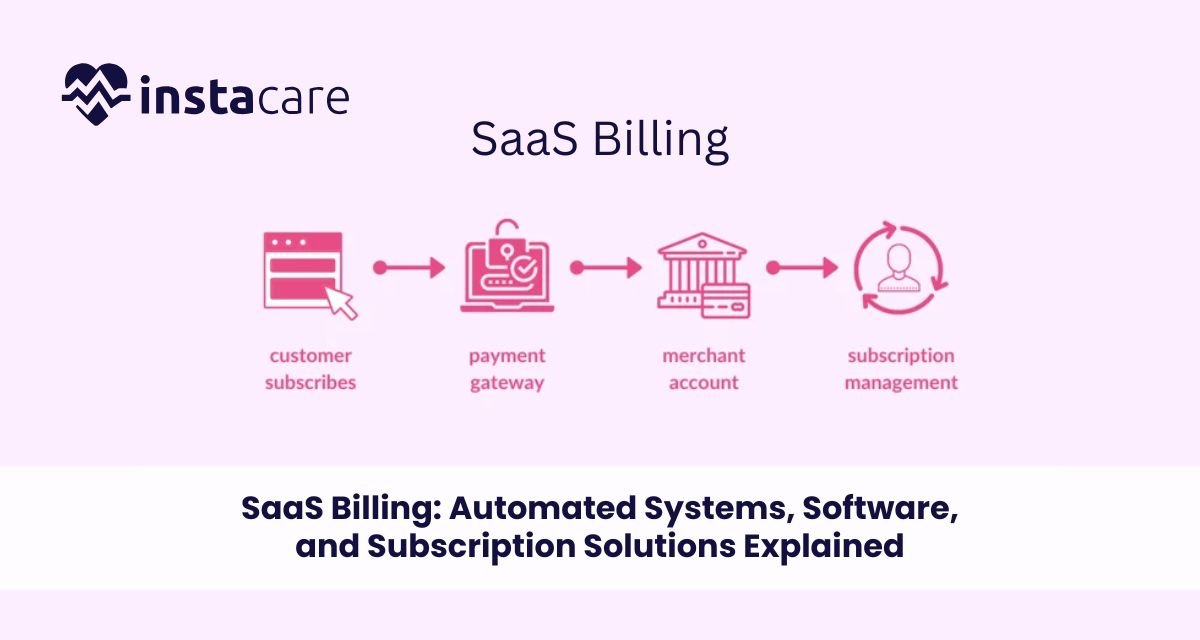
SaaS Billing: Software, Solutions, and Subscription Solutions Automated Defined Software as a Service (SaaS) business model has revolutionized how organizations provide value and interact with customers. Traditional software with one time payment does not come into play with SaaS business models in which organizations obtain recurring revenue from subscription plans, usage, or bundling fees. The revolution has brought with it the necessity for more effective automated SaaS billing platforms to enhance efficient operation, predictable SaaS revenue recognition, and customer satisfaction. Whether you’re a startup or an established SaaS company, understanding SaaS billing solutions and their role in your business is crucial to scale successfully and maintain financial health. What is SaaS Billing? SaaS billing refers to the procedures and processes through which customers are billed for software services monthly. SaaS subscription billing is distinct from standard billing procedures in that it supports flexible pricing, recurring charges, automated SaaS invoicing system, as well as subscription service-linked account management. SaaS billing procedures involve: Recurring SaaS subscription billing Automated remittance and invoicing Usage-based SaaS billing (metered billing) Tax calculation, discounts, and promotions Subscription management and upgrades In plain words, a SaaS billing platform allows convenient and effortless billing and payment for the business and customer. SaaS Billing Insights Recurring and Subscription-Based Models The recurring revenue model is the foundational concept of SaaS billing management. The customers pay monthly, quarterly, or annually for availing software services. Recurring billing for SaaS provides steady cash flow, predictable revenues, and improved customer retention. Metered and Usage-Based Charging Metered SaaS or usage billing SaaS pricing is applied primarily in SaaS companies when fees correlate directly with use of the service. Advanced tracking and autobilling infrastructure needs to be utilized to support it because billing must be done in real-time. Hybrid Billing Models Some SaaS businesses use both flat fee subscription and metered billing SaaS model. SaaS’s dynamic billing mechanism has to effectively address such variations to maintain billing accuracy and transparency to the customers. The Role Automated Billing Systems Play Automated SaaS billing is unavoidable for several reasons: Manual billing suffers from human error, delay, and compliance problems. SaaS auto-billing does away with them through auto-pay, time-saving for admins, and increased customer satisfaction. Core Billing Automation SaaS Solution Operations: Auto billing and auto payments: Does away with human error and improves cash flow. Subscription renewal and subscription management: Automates renewals, upgrades, downgrades, and cancellations. Usage tracking and metered billing: Allows for equitable billing of usage of services. Taxation and regulatory compliance: Complies with international tax laws, i.e., VAT and GST. Dunning management: Retry payments and notify customer for failed payments automated. Advantages of Automated SaaS Billing Systems: Improve accuracy and avert revenue loss Fosters customer trust through transparent billing Conserves time and operational expense Offers real-time analytics for customer and revenue activity Book Your Free Marketing Consultation SaaS Billing Software: Features and Benefits Main Features of SaaS Billing Software Flexible Pricing Configuration: Tiered pricing, freemium plans, and custom plans supported. Advanced SaaS Billings System: Invoicing automatically generated in real time with line item detail. Payment Gateway Integration: Multiple payment processors support for global acceptability. Subscription Life Cycle Management: Automatic trial period, renewals, cancellations, and refunds processing. Billings Analytics and Reporting: Revenue stream, churn rate, and customer lifetime value report in real time. SaaS Revenue Recognition Compliance: Automates revenue recognition in compliance with like ASC 606. Business Benefits of Using the Best SaaS Billings Software Scalability: Increasing bills with expanding customer base. Lower Churn: Effective billing and dunning save money and help reduce churn rate by retaining customers. Better Financial Projections: Reliable reports provide the ability to forecast revenues and cash flows. Customer Self-Service Functions: Allow customers to self-manage billing choices, change plans, or change payment units. SaaS Pricing Models 1. Flat-Rate Pricing A charge per period is levied by customers to access software features without restriction. Easy to charge but may be possible only for some customer segments. 2. Tiered Pricing Variable prices allow various levels of access or capability. Best suited to support more than one customer segment. 3. Usage-Based Billing (Metered Billing) Customers buy usage measures such as number of users, API calls, or used storage. Usage-based SaaS pricing models provide flexibility and fairness. 4. Freemium with Paid Upgrades Provide base functionality free and sell premium functionality through subscription. Must accommodate free and paying user bases within elastic SaaS billing infrastructure. 5. Hybrid Models Provide two or more pricing models to gain maximum flexibility and revenue optimization. Compliance and Security Considerations SaaS companies must comply with numerous payment, data privacy, and financial reporting requirements. Compliance Areas PCI-DSS Compliance: Secure handling of credit card transactions. GDPR and CCPA Compliance: Customer data privacy guaranteed. Tax Compliance: Tax calculation automatically calculated based on customer location and applicable laws. SaaS Revenue Recognition: Adhering to accounting standards for deferring reporting of revenue. Best Security Practices Employ secure payment gateways and encrypted APIs. Scan your SaaS billing application for security vulnerabilities regularly. Implement multi-factor authentication for admin and customer dashboards. How to Select the Best SaaS Billing Solution The best SaaS billing software is based on your business growth model, size, and strategy. Consider the Following Scalability: Does the solution grow with your business? Integration Capabilities: Does it integrate
